Saturday, April 20, 2019

Creating Video lesson with Camtasia Studio


Creating a video lesson with Camtasia Studio

Camtasia Studio is a software tool which we used for creating videos such as tutorial video to make our lesson effective in terms of teaching the lesson contents. 


Pros of Camtasia studio


a)  No limits on video length
The software does not have a limitation on the length of videos or any other project created using the software. This is a main benefit of Camtasia as certain projects such as sales presentations can be lengthy. I use the software for my product review videos and tutorials, so the length of my videos varies from a few minutes to hours.
b) Capable of recording anything
This software is capable of recording:
  • Computer screens
  • PowerPoint presentations
  • Computer camera or webcam
  • Voice narration
  • Any other audio and so on.
When recording your computer screen or PowerPoint presentations, you can turn on your computer camera and be featured in the videos. 
c) Editing videos
With the help of Camtasia studio, we can do editing visual effects to adding animations, power-points records, videos, and other visual representation. We will be able to edit almost anything with Camtasia Studio.
d) Importing and exporting
Camtasia supports .camproj, camrec, and .avi file formats when importing and exporting projects. All projects can be shared and transferred to multiple computers and locations. Screen recordings can be transferred from a PC to a Mac or vice versa.
e) Camtasia integrates well with other products
Because of the screen recording capabilities, the software will be able to record the usage of any third-party software.
f) Publish and share to YouTube
Completed projects can be published and uploaded to YouTube, Google Docs, and Screen-cast right from the Camtasia dashboard. This is very convenient and much easier than the sharing options found on other software.
Cons of Camtasia studio
a) Camtasia requires software
Through recording videos and capture on our computer screen, we have to download the Camtasia software which requires specific system requirements for Windows and Mac operating system.
b) DV camera support
Camtasia does not support live recording from a digital video camera which may be a deal breaker for those that still use a DV camera.
c) Software updates
we are not allowed to updates software to a new version of our current version. For example, if we have Camtasia Studio 8  and version 8.2 comes out, we will be able to update for free. However, if version 10 is released, we will have to pay to upgrade to the new version.

Getting started with Camtasia Studio
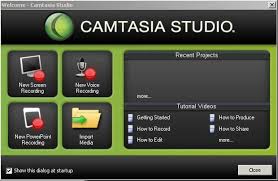
  1. click start menu
  2. Type 'Camtasia studio' in the search bar
  3. Select Camtasia studio
  4. welcome Camtasia Studio screen will be displayed
  5. Click on close button
Adding images
  1. click to import media
  2. insert any pictures from the folder
  3. select the image and click open
  4. drag the images to the storyboard
Text insert on image
  1. click on a particular image
  2. click to call out
  3. click plus sign
capture video using the phone/online
  1. Go to import media and select the files you want to import or insert
  2. click to show storyboard
  3. select all the images to insert once
How to add video on Camtasia studio
  1. Go to import media and select the files you want to import or insert
  2. Click to show storyboard
  3. select all the videos to insert in between the images
Transition effects to the images
  1. click on the image that you want to apply the effects
  2. select any transition of your choice
  3. Drag the effects in between the images and videos


Save the project to continue next time
  1. click to save the project as
  2. select the folder that you want to save
  3. give the title of the project
  4. click to save button to save the project 
How to post the online video/ready-made videos on the blog
  1. Go to compose in blog
  2. click the video icons
  3. choose the topic you want to upload by typing the title of the book or anything you like to search on youtube


                       Tutorial Video lesson created by Camtasia Studio


Cyberbullying


Cyberbullying


Cyberbullying is any type of bully which takes places through digital networks, where the society will experience in the 21st-century world. Moreover, cyberbullying is to treat other person or community frequently by using social media’s such as Facebook, Twitter, WeChat and so on. Cyberbullying and cyberharassment is a form of bullying or harassment using electronic means. It is also called online bullying.

Why do people cyberbully?

Cyber bullying happens for many of the same reasons as any other type of bullying, but it may be even more appealing because it can be done anonymously. They cyberbully because it helps them cope with their own low self-esteem, think it will help them fit in with their peers and have trouble empathizing with those they hurt.

The cyberbullying is mainly cause through the online:

  •  Anonymity

Cyberbullying allows bullies to avoid facing their victims, so it requires less courage and provides the illusion that bullies won’t get caught.

  • Ignorance of the consequences
The National Council on Crime Prevention reports that in a survey of teenagers, 81% said they believe others, cyberbullying because they think it’s funny. Because they don’t see their victims’ reactions in person, cyber bullies may not realize how much damage they are doing.
  • Social pressure
Some cyberbullies may think their behavior is normal and socially acceptable, especially when friends egg them on.

What Can We Do to Help Prevent Cyberbullying?

There are many ways to prevent Cyberbullying. The effective ways are as given below:

1. Talk
Every people will tell you that the best way to help your child or student is to have a conversation first. Be patient and ask a child about the problem in general: what is cyberbullying, does he/she know someone who is being bullied, what children should do if notice acts of bullying. This way you will see how much your child is involved in the situation and which side he/she is on.
2. Monitor online activity
Cyberbullying has one advantage that is, you can notice it and save the evidence. If taking their phone away is not an option, you can install phone monitoring app Pumpic. It allows monitoring social media activity, including Facebook and Instagram, views all text messages (even deleted ones), calls logs and general online behavior. 
3. Engage parents and youth
Create a community for adults and pupils to send a unified message against cyberbullying. Establish a school safety committee that will control and discuss the problems of online bullying. You can create policies and rules, including cyberbullying reporting system. It is important to make the main objectives known to parents, school and children
4. Build a positive climate


  As a teacher, we can use staff and parents meetings and even send newsletters. Create a page and forum, where parents can discuss the problem. Moreover, we can also engage bullies and victims by giving them mutual tasks so they can try to see each other from a different perspective.
5. Volunteer in the community
As a parent, we can prevent bullying by working in the community. With our experience on the ground, appropriate strategies can help identify the victims and redirect bullies’ behavior.
How to stop cyberbullying as an Educator?

           Educate yourself
 Reading this article is a good starting point. Also, check out other fact sheets and resource lists on the internet to get more information about how cyberbullying works and how to stop it.

Educate others
Does your school already have a policy against cyber-bullying? If you’re worried that your school administration isn’t doing enough to fight this problem, you could try speaking to school officials about your concerns and offering to help develop policies. If your school is already addressing the issue, see if you can help get the word out.

Create digital citizens
Cyberbullying is impersonal in nature. It is important to teach children that the same rules apply in and out of the digital world. Clearly teach students how to be cyber safe and savvy. The rules are taught, digital citizenship can be imparted through explicit teaching. 

Raise awareness
 Awareness is powerful. it can change social perceptions that create panic over technology use or spread misunderstandings, awareness allows a positive atmosphere to emerge. However, it talks about age-appropriate cases of cyberbullying and their resolution. It also showcases how technology is being used in our community.

Let parents involved

 Parents may often be unaware of cyberbullying, so it is important to report what is happening so that they can intervene at home. Educators might suggest parents buy filtering software or special phones for younger children and teenagers.

Establish open communication with students. 
Students need to know who and where they can go to before a problem occurs. By the time a situation escalates, it may be too late. Students may be so stressed with their situation that they may not be thinking logically. It’s best to make resources clear and available before situations become muddled with stress.  

Zero tolerance policy. 
Make students understand early on that bullying of any kind, including cyberbullying is unacceptable. The teachers should teach students about being responsible world citizens who are accepting of individual differences. moreover, the teacher should create activities that build on strengths, to show students how each person has something unique to contribute. Incorporate responsible technology use. Teach tolerance and respect for diversity. An open environment is best where individual differences are appreciated.


Thursday, April 11, 2019

Digital Citizenship


                             Digital citizenship

On 11th April 2019, we have learned on digital citizenship, cyberbullying and the nine elements of digital citizenship. The term digital citizenship is a holistic and positive approach to helping students learn how to be safe and secure, as well as smart and effective participants in a digital world. Moreover, digital citizenship is about a person using information technologies in order to engross in the world. According to Ribble (2015, p.15) states that digital citizenship as “the norms of appropriate, responsible behavior with regard to technology use". As associates of digital civilization, it is our concern to offer all handlers the chance to work, interact, and use technology deprived of prying, demolition, or obstacle by the activities of wrong handlers. There are nine elements of digital citizenship, digital access, digital commerce, digital communication, digital literacy, digital etiquette, digital law, digital rights and responsibilities, digital health and wellness, and digital security, can be pragmatic to the non-digital world. 

    
 There are nine elements of digital citizenship's are as follows:

    1. Digital commerce
Digital commerce means buying and selling of goods and services by using the internet, mobile networks, and commerce infrastructure. It involved the marketing activities that support these transactions of goods and services for the dealer as well as for customers in the world.
While we buy and sell good and services we have seen many problems arises such as technology hackers and identity of the dealersImproper usage of credit cards or debit cardsunsolicited email, and secure sites.


2. Digital access
Digital access talks about how many people actually have access to technology and educational resources within the technology. It is important to understand that not everyone has the same level of access, some have more, other less. Moreover, some people choose to engage in technology more frequently than others. The most important with the access is connect, internet, access, obtain, regain and gateway which all we can access through the internet.

3. Digital  communication
Digital communication actually means a mode of communication and the exchange of electronic information through digital network's. In the ancient era's communication is done in the form of letters, fixed-line telephone to convey messages and it takes more time This is due to the lack of digital technologies in our nations as well as for others.  Due to development and changes of digital technologies now the government and private organization use digital technologies to communicate effectively in and around the nations.

4. Digital literacy
Digital literacy means taking the skill we want to live, learn, and work in a community where communication and access information from digital technologies such as the internet, social media, and various digital networks. These provide an essential platform to the learners through three components such as social awareness, critical thinking, and knowledge of digital tools. By creating awareness on how to operate it will help the learner to learn better. Moreover, communication is also a key aspect of digital literacy. It plays vital roles in terms of clearly expressing your ideas, asks relevant questions, maintains respect, and build trust is just as important as when communicating with a person, However, we need practical skills in using technology to access, manage, manipulate and create information in an ethical and sustainable way.

5. Digital etiquette
It is important to know about the digital etiquette in term of using digital technologies what to post and what not to post on the digital network's. Nowadays people are in the society post and send vulgar messages in the digital networks. That why it is important for parents to clarify their children’s in what way to act and treat them while usage of digital networks. If parents fail to do so, there will be harassing and cyberbullying. The parents should guide their own child and give advice on what to do or what not to do in the digital networks. moreover, to prevent harassment and cyberbullying. In order to overcome this, we should be: Respect others views, Think twice before you post it, check information is true or false, and avoid doing harassment and cyberbullying in digital networks.

6. Digital law
Digital law is the legal rights and restriction imposed by the government for digital usage to prevent
people from trying to do hacking, creating a virus to destroy other systems or organizations. For example, stealing others ideas, documents, plagiarizing others works and hacking is against the digital law. It has higher chances they will sue in lieu and to make digital usage safe and accessible digital law is essential.

7. Digital rights and responsible
We have the right to use all kinds of digital technologies while using it must be in an appropriate manner and should not abuse the right of other people. Unlike in Bhutan there are many issues on plagiarism and violating rules on other peoples right. We have the right to use others works by proper citing, acknowledging to the authors. We do have the right responsibility to value and respect others rights.

8. Digital health and wellness
Digital health and wellness refer to physical and psycho-social well-being in a technological
world. Excess use of digital technology may effects eyes and isolation from social interaction and personal health. If I think another way it is useful where we can access information to learn new ideas, boost creativity and to be productive citizenship. Nowadays there is an increasing concern that some people are becoming Internet-addicted. They exhibited compulsive behavior and causes high levels of stress on family, friends, and society.

9. Digital security
Digital security means the precautions that the user takes to guarantee their personal safety and the security of their network. With the changes and advance development of nations with digital technology, there will a high chance of criminals will arise in our personal documents and create a viral in the digital networks. So, to protect our identity and keep our documents safe we should update our security systems. 

Reference
Ribble, M. (2015). Digital citizenship in schools: Nine elements all students should know (3rd ed.). Eugene, OR: International Society of Technology in Education.


Lesson plan -phET simulation

Name : Tashi Tobgay - 06150254 Subject : science Class : 5 Chapter : State of matter Activity : Simulation Objectives :  By ...